What is BIMI? Brand Indicators for Message Identification
 ChatGPT
 Claude
 Gemini
 Perplexity
 Grok
GrokIn brief
BIMI is an email standard that lets supporting inboxes display a verified brand logo after DMARC authentication and receiver checks for supported senders.
BIMI, short for Brand Indicators for Message Identification, is an email standard that lets a supporting mailbox provider display a sender's brand logo beside authenticated email. A domain publishes a BIMI DNS record that points to a compliant logo and, where the receiver requires one, a mark certificate. BIMI depends on DMARC enforcement, but a valid record does not guarantee that every provider will display the logo.
At a glance
Quick takeaways
- BIMI connects an authenticated sending domain to a published brand logo.
- A BIMI record is a DNS TXT record, commonly published at
default._bimi.yourdomain.com. - BIMI requires the domain to publish an enforced DMARC policy before participating.
- The logo must meet the BIMI SVG profile, not merely be any SVG exported by a design tool.
- A receiver may require a certificate before it displays a BIMI logo.
- A receiver makes the final logo-display decision under its own policies.
How BIMI works
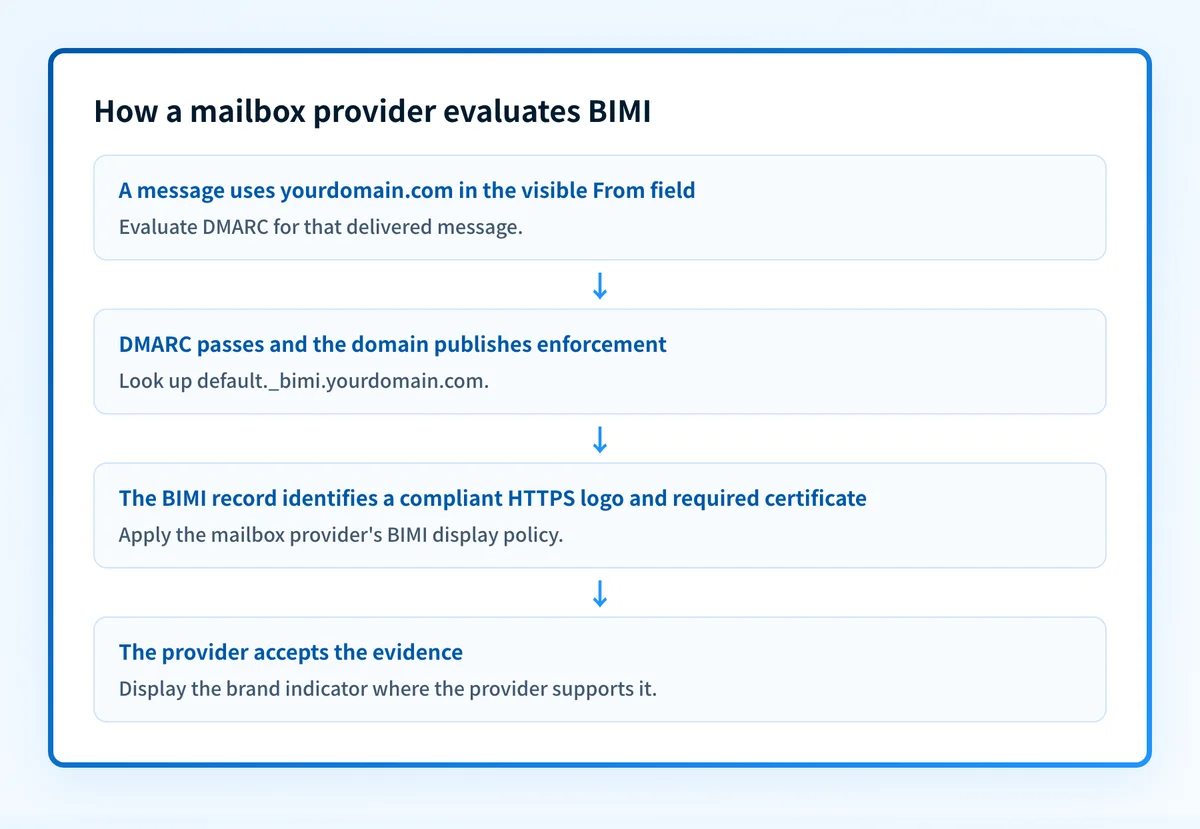
The BIMI Group's implementation guidance describes BIMI as a way for a domain owner to publish a logo that participating mailbox providers can retrieve after evaluating the incoming message and the domain's authentication posture.
The process has four connected parts:
- The message uses a visible From domain, such as
yourdomain.com. - The receiving mailbox provider evaluates DMARC for that message. DMARC requires an aligned SPF or DKIM pass, as defined in RFC 9989.
- The receiver looks up the BIMI record for the From domain and retrieves the logo location.
- The receiver evaluates its own BIMI eligibility rules, including any certificate requirement, before deciding whether to show a logo.
For the wider DNS and authentication context, visit the email infrastructure learning hub. If a domain is still collecting reports at p=none, it has not reached the enforced DMARC posture BIMI implementations expect.
When BIMI display can change
BIMI eligibility is not the same as logo display. The receiver controls the display decision, so a sender can publish a syntactically valid record and still see no logo in a particular inbox.
The answer changes with these conditions:
- DMARC policy: BIMI implementation guidance requires a DMARC policy of
quarantineorreject. A monitoring-only policy ofp=nonedoes not meet that condition. Although RFC 9989 removed the legacypcttag from DMARC, current BIMI guidance still does not accept a published value below 100. - DMARC alignment: The specific delivered message must pass DMARC. A valid BIMI record cannot compensate for an SPF or DKIM alignment failure.
- Logo format: The logo URL must lead to a file that meets the BIMI SVG Tiny Portable/Secure profile. A conventional SVG can include elements that the BIMI profile does not allow.
- Certificate policy: Some receivers require a Verified Mark Certificate or another accepted certificate before they display a logo. Check the receiving provider's current BIMI documentation before buying or publishing a certificate.
- Mailbox-provider support: A provider that does not implement BIMI will not display the indicator, regardless of the sender's DNS configuration.
- Local receiver policy: A supporting provider can apply additional trust and anti-abuse controls. BIMI does not override those controls.
Do not move a domain top=quarantineorp=rejectsolely to obtain a logo. First identify legitimate sending sources and confirm aligned authentication for important mail streams.
The opportunity is measurable: Palisade's BIMI adoption data from 100,000 domains shows how many enforcement-ready domains have yet to publish a BIMI record, with a reusable funnel chart and downloadable counts.
Which providers support BIMI?
Major inbox providers have adopted the standard. Gmail, Yahoo, and Apple all incorporate BIMI into their platforms — Apple Mail requires a VMC — and Google expanded Gmail's BIMI support in May 2023 to add a verified checkmark beside participating senders. Publishing a valid record puts the brand logo in front of users of those services, subject to each provider's own display decision.
The engagement case rests on that visibility. A 2021 consumer study by Red Sift and Entrust found open rates up to 39% higher when a brand logo was displayed with the message. Treat that as directional evidence rather than a guarantee: the receiver still controls whether a logo appears, and results vary by audience and provider.
Worked BIMI record example
A BIMI record is normally published as a TXT record beneath the selector and _bimi label. The BIMI Group documents default as the usual selector, though a receiver can use the selector in the message's BIMI-Selector header when present.
Host: default._bimi.yourdomain.com
Type: TXT
Value: v=BIMI1; l=https://assets.yourdomain.com/logo.svg; a=https://assets.yourdomain.com/mark.pem
This is illustrative only. Do not publish these example URLs. Your organization must host its own approved logo and use the certificate location issued for its own mark, when a target receiver requires one.
In this example:
v=BIMI1identifies the record as BIMI.l=identifies the HTTPS location of the BIMI-compliant SVG logo.a=identifies the HTTPS location of a mark certificate.
A public DNS result can show whether the record is visible. It cannot prove that a specific production message passed DMARC, that the receiver fetched the logo, or that the receiver chose to display it.
What to check next
Start with the evidence you have:
- If you only have a domain name, use the BIMI lookup tool to inspect the publicly visible BIMI record and its logo or certificate URLs.
- If you are preparing a logo, validate that the final hosted file conforms to the BIMI SVG profile. Keep the design source separate from the published BIMI file.
- If you have a delivered test message, inspect its authentication results. RFC 8601 defines the
Authentication-Resultsheader field used to report authentication evaluations. Confirm that the real sending path has an aligned SPF or DKIM pass before treating BIMI as the problem. - If a mailbox provider does not show the logo, compare its documented BIMI requirements with the exact message path, DNS record, logo file, and certificate evidence. Do not infer a provider decision from DNS alone.
Check the public BIMI record first
A BIMI lookup is the right first action when you have a sending domain and need to confirm what the public DNS record currently publishes.
A public lookup cannot prove that the production sender passes DMARC, that every receiver supports BIMI, or that a mailbox provider will display the logo.
Keep BIMI readiness connected to real sending evidence
A correct record today does not identify every sending source that may later fail alignment, and it does not show whether a policy change affects a different application or subdomain. Palisade is DMARC software that analyzes DMARC aggregate-report data, identifies sending sources and authentication or alignment issues, and creates prioritized remediation tickets. It can propose a next policy step when the evidence supports it, while a human reviews the evidence and applies the DNS change.
Palisade does not autonomously change a DMARC policy, guarantee logo display, or guarantee inbox placement.
Evidence
Sources and further reading
Questions readers ask
Frequently asked questions

Written by
Samuel ChenardCEO & Co-Founder, Palisade
Samuel Chenard is the CEO and co-founder of Palisade, AI-first DMARC software for IT teams and MSPs, from one domain to thousands.
More from Samuel →