What is spoofing? Email spoofing attacks explained
 ChatGPT
 Claude
 Gemini
 Perplexity
 Grok
GrokIn brief
Spoofing is impersonation that falsifies an email, IP, or caller identity. Learn how email spoofing works, how to verify it, and what to check.
Spoofing is an impersonation attack in which someone falsifies an identity signal to appear trustworthy. Email spoofing makes a message appear to come from a person or domain the sender does not control. IP spoofing falsifies source IP information in network traffic, while caller-ID spoofing falsifies the displayed calling number. SPF, DKIM, and DMARC help domain owners address email spoofing. They do not control IP or caller-ID spoofing.
At a glance
Quick takeaways
- Email spoofing falsifies an email identity, often the visible From address, to make a message look legitimate.
- A visible From address alone does not prove who sent a message.
- IP spoofing and caller-ID spoofing are separate attack types with different controls and evidence.
- SPF and DKIM provide authentication signals that DMARC evaluates against the visible From domain.
- A DMARC record helps a domain owner request handling for email that fails DMARC, but each receiving system makes its own delivery decision.
- Public DNS checks show published records, not whether a specific production message authenticated.
How spoofing works
In email, a recipient commonly sees the message's From field. RFC 5322 defines the Internet Message Format, including the From header field that identifies the author or authors of a message. An attacker can put a familiar address or domain in that field, so the display name and visible address can look convincing without proving the actual sending system is authorized.
Receiving systems can add an Authentication-Results header to record their authentication assessment. RFC 8601 defines this message authentication status header, including results for methods such as SPF and DKIM. A delivered message's headers therefore provide stronger evidence than the address a mail app displays.
For the header-by-header walkthrough and the visible signals that give a forgery away first, see how to spot an email sender spoof.
For a domain owner, DMARC connects the visible From domain with SPF or DKIM authentication and alignment. A message can pass DMARC when SPF or DKIM passes and the authenticated domain aligns with the visible From domain. DMARC can also publish a requested policy for failures and reporting destinations.
Email authentication does not establish that the message's content is safe or that a recipient should trust a payment request. It establishes evidence about authorized use of the From domain.
For the email-authentication context, visit the DKIM learning hub.
When the answer changes
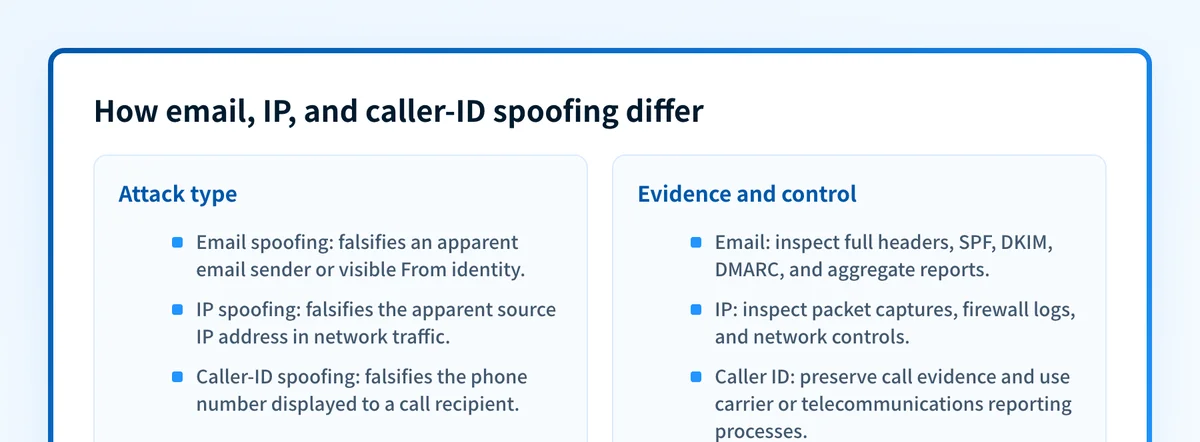
The word "spoofing" is broad, so use the evidence type to identify the attack.
- Email spoofing: The concern is an email's apparent sender. Inspect the full message headers, then compare the visible From domain with SPF, DKIM, and DMARC results. What is email spoofing and how can you prevent it? covers that narrower task.
- IP spoofing: The concern is a falsified network source address. Packet captures, firewall logs, routing controls, and network-provider evidence are relevant. DMARC cannot validate an IP packet's source address.
- Caller-ID spoofing: The concern is a phone number shown to the recipient. Call records, the carrier, and applicable telecommunications reporting channels are relevant. The Federal Communications Commission's caller ID guidance explains that spoofing caller ID with intent to defraud, cause harm, or wrongfully obtain anything of value is prohibited in the United States.
A worked email spoofing example
A mail client may show a familiar address:
From: Finance Team <finance@yourdomain.com>
Authentication-Results: receiver.example;
  spf=fail smtp.mailfrom=attacker.example;
  dkim=fail header.d=attacker.example;
  dmarc=fail header.from=yourdomain.com
This is illustrative only. Do not publish unredacted production headers because they can contain recipient addresses, message identifiers, routing data, and internal hostnames.
In this example, the visible From domain is yourdomain.com, but the recorded SPF and DKIM results fail for attacker.example. The DMARC result also fails for yourdomain.com. The syntax and meaning of Authentication-Results fields come from RFC 8601.
A different result can change the interpretation. A message may have a valid DKIM signature but still fail DMARC if the DKIM signing domain does not align with the visible From domain. Conversely, a passing DMARC result shows authentication and alignment evidence for that message path. It does not prove the sender's business request is legitimate or guarantee inbox placement.
What to do when you suspect email spoofing
Start with the evidence you have.
- If you received a suspicious message, preserve it and inspect its full headers. Compare the visible From domain with its
Authentication-Resultsvalues before forwarding or deleting the original evidence. - If you manage the impersonated domain, check the public DMARC record and confirm the intended policy is published. Use the DMARC checker for the domain, then compare the result with your DNS change record.
- If the message claims to come from your organization, review DMARC aggregate-report data to identify legitimate sources that still lack aligned SPF or DKIM. How can you stop spoofing attacks? explains the prevention work in more detail.
- If the issue is IP or caller-ID spoofing, preserve network or call evidence and use the channel's own reporting and operational process. Domain authentication is not the control for those attack types.
Do not move a domain to a stricter DMARC policy based only on a public DNS lookup. Test important production sending paths and review aggregate-report evidence first, because legitimate mail can fail when its SPF or DKIM identifiers do not align.
Inspect the domain authentication behind a suspected email spoof
A suspicious email that uses your domain raises a specific question: does the domain publish a DMARC policy, and what does that public record request? Check the domain before changing DNS, then compare the result with message-header evidence and DMARC reports.
Palisade is agent-first DMARC software that analyzes DMARC aggregate-report data, identifies sending sources and authentication or alignment issues, and proposes prioritized remediation work for human review. A signup and a public-record check do not prove that a particular email was spoofed, repair IP or caller-ID spoofing, or guarantee a receiver's delivery decision.
Evidence
Sources and further reading
Questions readers ask
Frequently asked questions

Written by
Samuel ChenardCEO & Co-Founder, Palisade
Samuel Chenard is the CEO and co-founder of Palisade, AI-first DMARC software for IT teams and MSPs, from one domain to thousands.
More from Samuel →