What is an MTA? Mail Transfer Agents Explained
 ChatGPT
 Claude
 Gemini
 Perplexity
 Grok
GrokIn brief
What is an MTA? Learn how a mail transfer agent sends, receives, routes, queues, and relays email between mail servers using SMTP and DNS.
An MTA, or Mail Transfer Agent, is software that transfers email between mail systems using SMTP. It accepts a message, determines the next mail server, relays the message or hands it off for local delivery, and can queue it when the next server is temporarily unavailable. An MTA moves mail between systems. It is different from the email application a person uses to read and compose messages.
At a glance
Quick takeaways
- An MTA is a mail server component that relays email through SMTP.
- MTAs use DNS MX records to find the receiving mail system for a domain.
- SMTP envelope addresses control routing and can differ from the visible From address.
- A receiving system can evaluate SPF, DKIM, and DMARC after it receives a message.
- An MTA can queue a message for later retry when immediate delivery fails temporarily.
- A public MX lookup shows published routing records, not the actual production route or a receiver's final delivery decision.
How an MTA transfers email
The Internet Mail Architecture RFC defines a Message Transfer Agent as a component that relays mail from one MTA to another. The SMTP protocol defines how an SMTP client sends a message to an SMTP server, including the envelope commands and message transfer process.
A sender normally composes a message in a Mail User Agent, such as a desktop or web email application. That application submits the message to a sending MTA. The sending MTA then needs a destination for the recipient domain.
For mail addressed to person@example.net, the sending MTA queries DNS for the domain's MX records. RFC 5321 describes MX lookup for SMTP delivery, including the use of MX preference values to choose an appropriate target host. The MTA opens an SMTP connection to that host, transfers the message, and records whether the remote server accepted it.
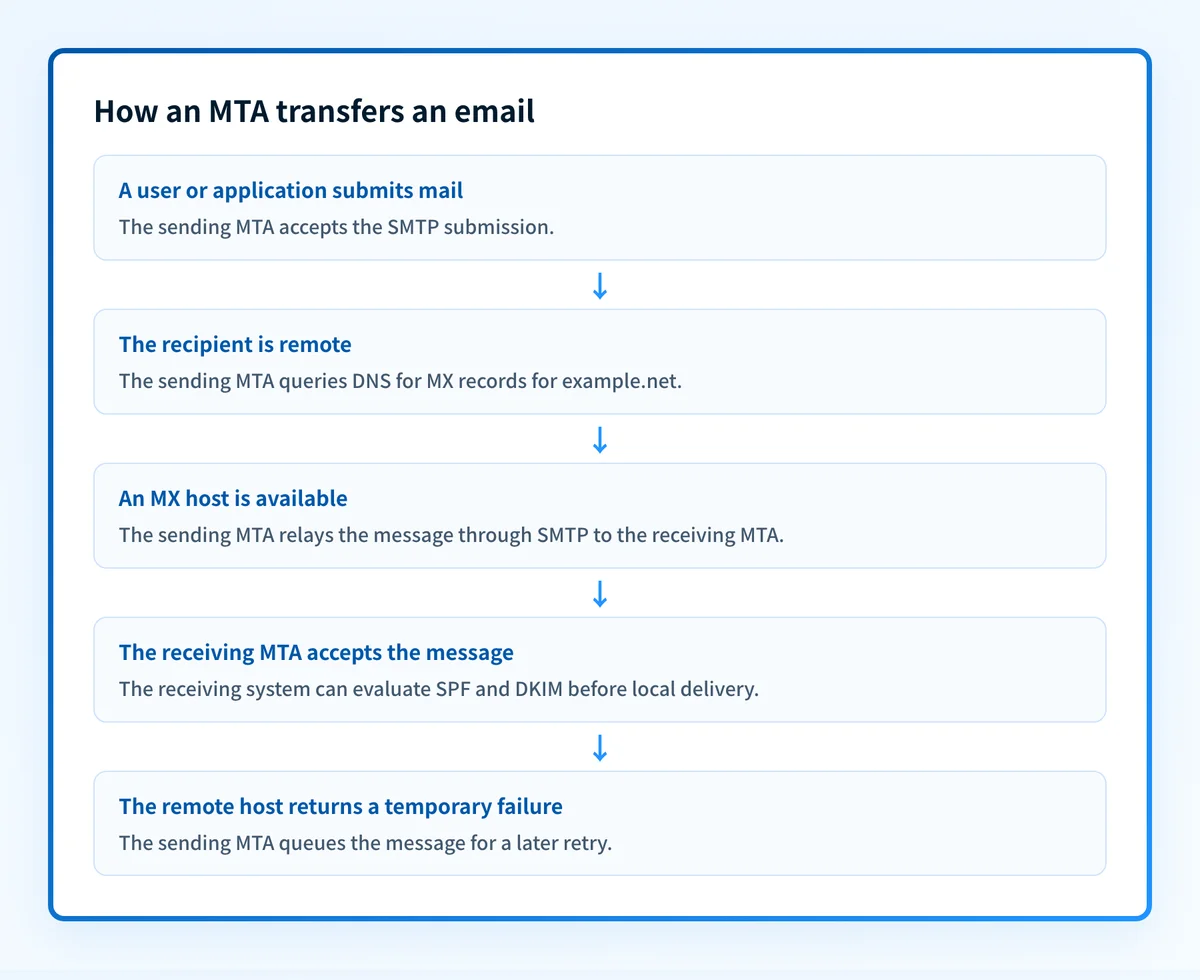
The flow separates routing from authentication:
- DNS and MX records tell the sending MTA where to attempt delivery for the recipient domain. See what an MX record is for the DNS side of that decision.
- SMTP transfers the message between mail systems. SMTP also defines the envelope commands used during that transfer.
- SPF lets a receiver evaluate whether the connecting IP address is authorized for the SMTP envelope sender's domain, as specified in RFC 7208.
- DKIM lets a receiver validate a signature carried in the message against a public key in DNS, as specified in RFC 6376.
- DMARC uses aligned SPF or DKIM results with the visible From domain. The MTA may participate in these checks, but the exact filtering and delivery behavior is specific to the receiving system.
Received trace fields to the message. The final MTA can pass accepted mail to a delivery component that stores it in the recipient's mailbox.
When an MTA's role changes
An MTA always handles message transfer, but its role in a mail flow depends on where it sits.
A submission MTA accepts outbound mail from users or applications. It commonly requires authentication because it accepts mail for onward relay. A relay MTA accepts a message from another mail system and forwards it toward the recipient domain. A destination MTA accepts mail for a domain it hosts and hands it to local delivery.
The routing decision also changes when the destination is local. If the MTA hosts example.net, it does not need to contact that domain's MX host to deliver a message to a local mailbox. It can hand the message to the local delivery path instead.
A temporary SMTP failure can cause the sending MTA to queue the message and retry later. An SMTP reply in the 4xx range indicates a temporary negative completion reply, while 5xx replies indicate a permanent negative completion reply under RFC 5321 reply-code rules. The receiving server's reply matters: an MTA cannot make a recipient server accept a message it has rejected.
Do not configure an MTA to relay mail for arbitrary unauthenticated senders. An open relay can be abused to send unsolicited mail and can damage the domain or IP address's reputation.
SPF and DKIM are also not universal MTA actions. A sender can sign a message with DKIM before transmission, while a receiver can verify that signature after receiving it. SPF evaluation uses the SMTP connection and envelope context. A message can therefore be successfully transferred by SMTP while still failing an authentication check or being handled differently by the receiver.
A worked SMTP envelope example
SMTP routing uses the envelope, not the visible message headers alone. This illustrative example shows a sending MTA transferring a message for example.net.
EHLO mta.sender.example
MAIL FROM:<bounce@sender.example>
RCPT TO:<person@example.net>
DATA
From: Alerts <alerts@sender.example>
To: Person <person@example.net>
Subject: Example message
Test message body.
.
In this example:
MAIL FROMsupplies the SMTP envelope sender. SPF evaluation commonly uses this domain when the message has a usable envelope sender.RCPT TOsupplies the recipient address for this SMTP transaction. The sending MTA uses theexample.netdomain to look up delivery routing.- The
From:header is visible to the recipient. It can differ fromMAIL FROM, which is why routing evidence and DMARC evidence answer different questions. - The period on a line by itself ends the SMTP
DATAcontent, as defined in RFC 5321 message-content rules.
What to check when mail depends on an MTA
Start with the evidence you have.
- If you only know the recipient domain, inspect its published MX records and compare them with the hostname your MTA attempted. An MX record lookup can identify public DNS routing targets.
- If you have an SMTP log, compare the attempted host, reply code, envelope sender, and recipient with the exact transaction that failed.
- If the message was delivered, inspect its full headers.
Authentication-Resultsrecords the authentication assessment made by the receiving system, and RFC 8601 defines that header field. - If you operate the sending domain, use DMARC aggregate reports after they accumulate to identify sources and recurring authentication or alignment issues. This is the evidence needed before changing a DMARC policy.
Check the recipient domain's published mail route
If you have a recipient domain but no SMTP logs, look up its MX records before comparing the result with the MTA configuration or delivery log.
A public MX lookup cannot prove which host your production MTA contacted, whether that host accepted a specific message, or how the receiving system evaluated SPF, DKIM, DMARC, reputation, or inbox placement.
Evidence
Sources and further reading
Questions readers ask
Frequently asked questions

Written by
Samuel ChenardCEO & Co-Founder, Palisade
Samuel Chenard is the CEO and co-founder of Palisade, AI-first DMARC software for IT teams and MSPs, from one domain to thousands.
More from Samuel →